Tutorial
Installation
TransferMatrix.jl is a part of Julia's general registry and the source code can be found at https://github.com/garrekstemo/TransferMatrix.jl. From the Julia REPL, enter the package manager mode mode by typing ]. Then just enter the following to install the package:
pkg> add TransferMatrixA simple calculation
To get up and running, let's build a simple two-layer structure of air and glass and calculate the reflectance and transmittance to visualize the Brewster angle for p-polarized light. We fix the wavelength of incident light and vary the angle of incidence.
We start by making a Layer of air and a Layer of glass. We'll do this for a wavelength of 1 μm. Since there are only two layers and the transfer matrix method treats the first and last layers as semi-infinite, there is no need to provide a thickness for our glass and air layers. From the examples below, you can see that there are fields for
- the material
- the layer thickness
The material is a RefractiveMaterial from the RefractiveIndex.jl package. You can also initize a Layer with data for the refractive index and extinction coefficient.
using TransferMatrix
using RefractiveIndex

n_air = RefractiveMaterial("other", "air", "Ciddor")
n_glass = RefractiveMaterial("glass", "soda-lime", "Rubin-clear")[1]
air = Layer(n_air, 0.1)
glass = Layer(n_glass, 0.1)
layers = [air, glass];
2-element Vector{Layer{F, Nothing, Float64} where F}:
Layer{RefractiveIndexExt.var"#refractive_index##2#refractive_index##3"{RefractiveIndex.RefractiveMaterial{RefractiveIndex.Gases{5}}}, Nothing, Float64}(RefractiveIndexExt.var"#refractive_index##2#refractive_index##3"{RefractiveIndex.RefractiveMaterial{RefractiveIndex.Gases{5}}}(RefractiveIndex.RefractiveMaterial{RefractiveIndex.Gases{5}}("air (Ciddor 1996: n 0.23–1.690 µm)", "P. E. Ciddor.\nRefractive index of air: new equations for the visible and near infrared.\n<a href=\"https://doi.org/10.1364/AO.35.001566\"><i>Appl. Optics</i> <b>35</b>, 1566-1573 (1996)</a><br>\n[<a href=\"https://github.com/polyanskiy/refractiveindex.info-scripts/blob/main/scripts/Ciddor%201996%20-%20air.py\">Calculation script (Python)</a> - can be used to calculate the refractive index of air for specific values of humidity, temperature, pressure, and CO<sub>2</sub> concentration]\n", "Standard air: dry air at 15 °C, 101.325 kPa and with 450 ppm CO<sub>2</sub> content.\n", RefractiveIndex.Gases{5}((0.0, 0.05792105, 238.0185, 0.00167917, 57.362)), (0.23, 1.69), Dict{Symbol, Any}(), Dict{Symbol, Any}(:type => "formula 6", :wavelength_range => "0.23 1.690", :coefficients => "0 0.05792105 238.0185 0.00167917 57.362"))), nothing, 0.1)
Layer{RefractiveIndexExt.var"#refractive_index##2#refractive_index##3"{RefractiveIndex.RefractiveMaterial{RefractiveIndex.Cauchy{5}}}, Nothing, Float64}(RefractiveIndexExt.var"#refractive_index##2#refractive_index##3"{RefractiveIndex.RefractiveMaterial{RefractiveIndex.Cauchy{5}}}(RefractiveIndex.RefractiveMaterial{RefractiveIndex.Cauchy{5}}("soda-lime (Rubin 1985: Clear; n,k 0.31–4.6 µm)", "M. Rubin.\nOptical properties of soda lime silica glasses.\n<a href=\"https://doi.org/10.1016/0165-1633(85)90052-8\"><i>Sol. Energy Mater.</i> <b>12</b>, 275-288 (1985)</a>\n", "Clear soda lime silica window glass\n", RefractiveIndex.Cauchy{5}((1.513, -0.003169, 2.0, 0.003962, -2.0)), (0.31, 4.6), Dict{Symbol, Any}(), Dict{Symbol, Any}(:type => "formula 5", :wavelength_range => "0.31 4.6", :coefficients => "1.5130 -0.003169 2 0.003962 -2"))), nothing, 0.1)Now that we have our glass and air layers, we can iterate over the angles of incidence and compute the reflectance and transmittance for light of wavelength 1 μm.
λ = 1.0
θs = 0.0:1:85.0
result = sweep_angle([λ], deg2rad.(θs), layers; verbose=true);
TransferResult{Matrix{Float64}}([0.9582785877594538; 0.9582953838154179; … ; 0.5734997718821019; 0.5074518215111196;;], [0.9582785877594538; 0.9582617886164638; … ; 0.30758273797770286; 0.2640608336864994;;], [0.0; 0.0; … ; 0.0; 0.0;;], [0.0; 0.0; … ; 0.0; 0.0;;], [0.04172141224054622; 0.041704616184581635; … ; 0.42650022811789795; 0.4925481784888802;;], [0.04172141224054622; 0.04173821138353588; … ; 0.6924172620222971; 0.7359391663135004;;], [0.0; 0.0; … ; 0.0; 0.0;;], [0.0; 0.0; … ; 0.0; 0.0;;])Let's now plot the result using the Makie.jl data visualization package.
using CairoMakie

brewster = atan(n_glass(λ)) * 180 / π

f = Figure()
ax = Axis(f[1, 1], xlabel = "Incidence Angle (°)", ylabel = "Reflectance / Transmittance")
lines!(θs, result.Tss[:, 1], label = "Ts", color = :firebrick3)
lines!(θs, result.Tpp[:, 1], label = "Tp", color = :orangered3)
lines!(θs, result.Rss[:, 1], label = "Rs", color = :dodgerblue4)
lines!(θs, result.Rpp[:, 1], label = "Rp", color = :dodgerblue1)
vlines!(brewster, color = :black, linestyle = :dash)
text!(35, 0.6, text = "Brewster angle\n(Rp = 0)")

axislegend(ax)
f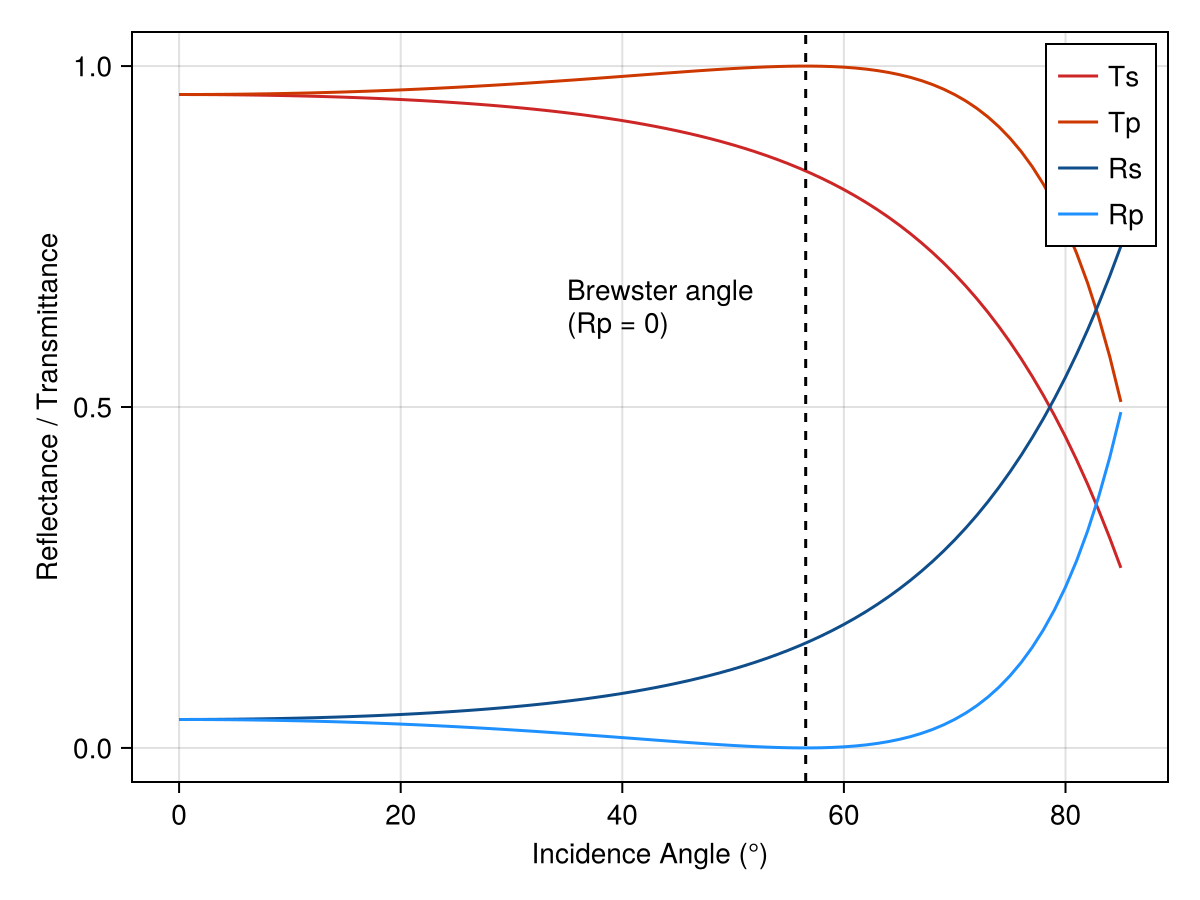
We can see that the result of the angle-resolved calculation has four solutions: the s-wave and p-wave for both the reflected and transmitted waves. And we see that the Brewster angle is $\arctan\left( n_\text{glass} /n_\text{air} \right) \approx 56^{\circ}$, as expected. Simultaneous calculation of s- and p-polarized incident waves is a feature of the general 4x4 transfer matrix method being used. The sweep_angle function will also loop through all wavelengths so that you can plot a color plot of wavelength and angle versus transmittance (or reflectance).
Using constant refractive indices
If you don't need wavelength-dependent dispersion, you can create a layer with a constant refractive index by wrapping the value in a function:
# Constant real refractive index
layer = Layer(λ -> 1.5, 0.1)

# Constant complex refractive index (with absorption)
layer = Layer(λ -> 1.5 + 0.01im, 0.25)
The Layer struct expects a dispersion function λ -> n(λ), so a bare number like Layer(1.5, 0.1) will not work. The lambda wrapper λ -> 1.5 creates a function that returns the same value for any wavelength.
This is useful for quick calculations, testing, or when working with materials whose dispersion is negligible over your wavelength range of interest.
A simple multi-layered structure
Now that we can make Layers, we can put them together to calculate the transfer matrix for a multi-layered structure and plot the reflectance and transmittance spectra. An important structure in optics is the Fabry-Pérot etalon, made with two parallel planar mirrors with a gap between them. If we set the optical path length to be an integer multiple of half the wavelength, we get constructive interference and a resonance in the transmittance spectrum. In the frequency domain, the cavity modes are evenly spaced by the free spectral range (FSR). We will scan in the mid infrared between 4 and 6 μm and use data generated via the Lorentz-Drude model for each 10 nm-thick gold mirror. (Note that we stay in units of micrometers for the wavelength.)
caf2 = RefractiveMaterial("main", "CaF2", "Malitson")
au = RefractiveMaterial("main", "Au", "Rakic-LD")
air = RefractiveMaterial("other", "air", "Ciddor")

λ_0 = 5.0
t_middle = λ_0 / 2
air = Layer(air, t_middle)
au = Layer(au, 0.01)
layers = [air, au, air, au, air];

λs = range(2.0, 6.0, length = 500)
frequencies = 10^4 ./ λs

Tp = Float64[]
Ts = Float64[]
Rp = Float64[]
Rs = Float64[]
for λ in λs
    result = transfer(λ, layers)
    push!(Tp, result.Tpp)
    push!(Ts, result.Tss)
    push!(Rp, result.Rpp)
    push!(Rs, result.Rss)
end

f, ax, l = lines(frequencies, Ts)
ax.xlabel = "Frequency (cm⁻¹)"
ax.ylabel = "Transmittance"
f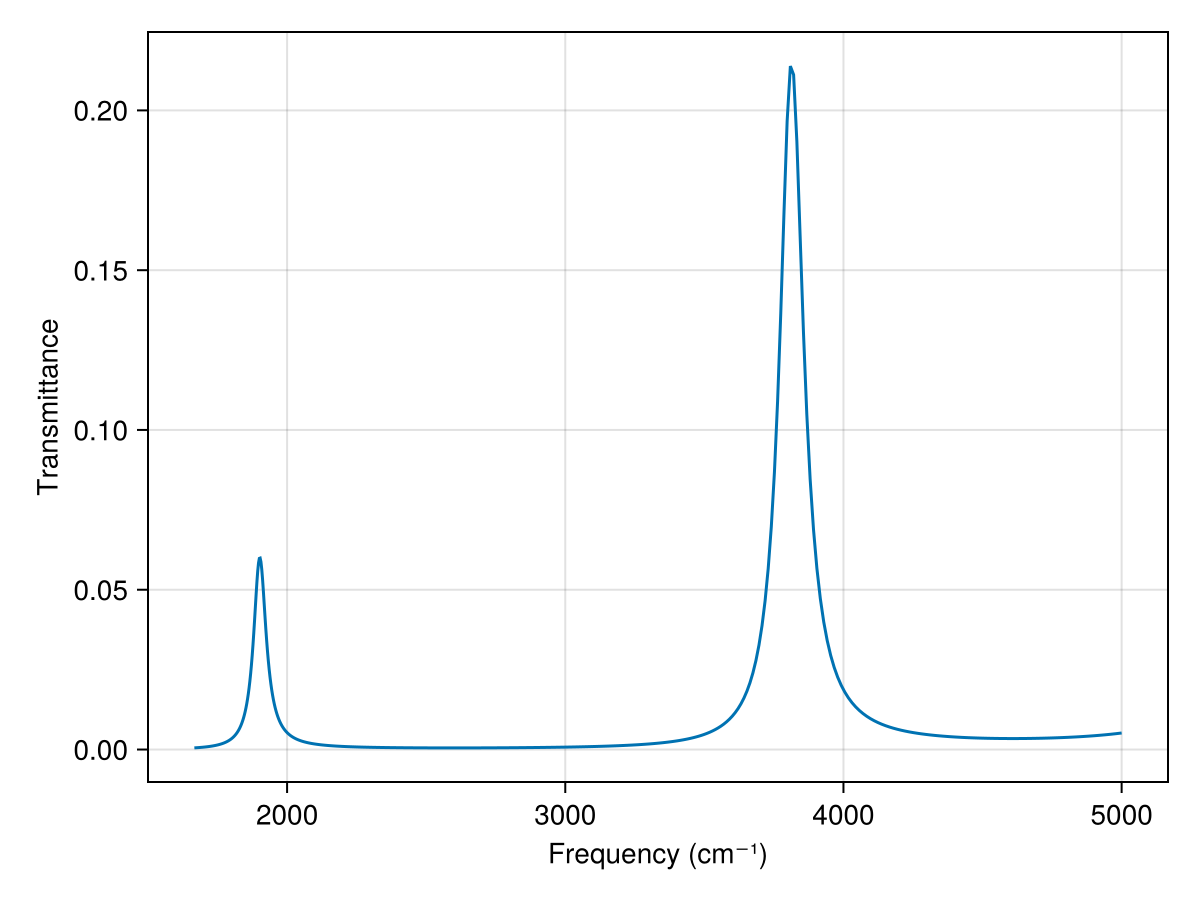
Electric field calculation
The wavelength-dependent electric field is the cavity is provided by the efield function. We can calculate the electric field at the first peak in the above plot using
λ_min = findfirst(λs .> 4.9)
λ_max = findfirst(λs .> 5.5)
peak = findmax(Ts[λ_min:λ_max])[2] + λ_min - 1
λ = λs[peak]

field = efield(λ, layers)

f, ax, l = lines(field.z .* 1e3, real(field.p[1, :]))
vlines!(field.boundaries[1], color = :black, linestyle = :dash)
vlines!(field.boundaries[end] .* 1e3, color = :black, linestyle = :dash)
f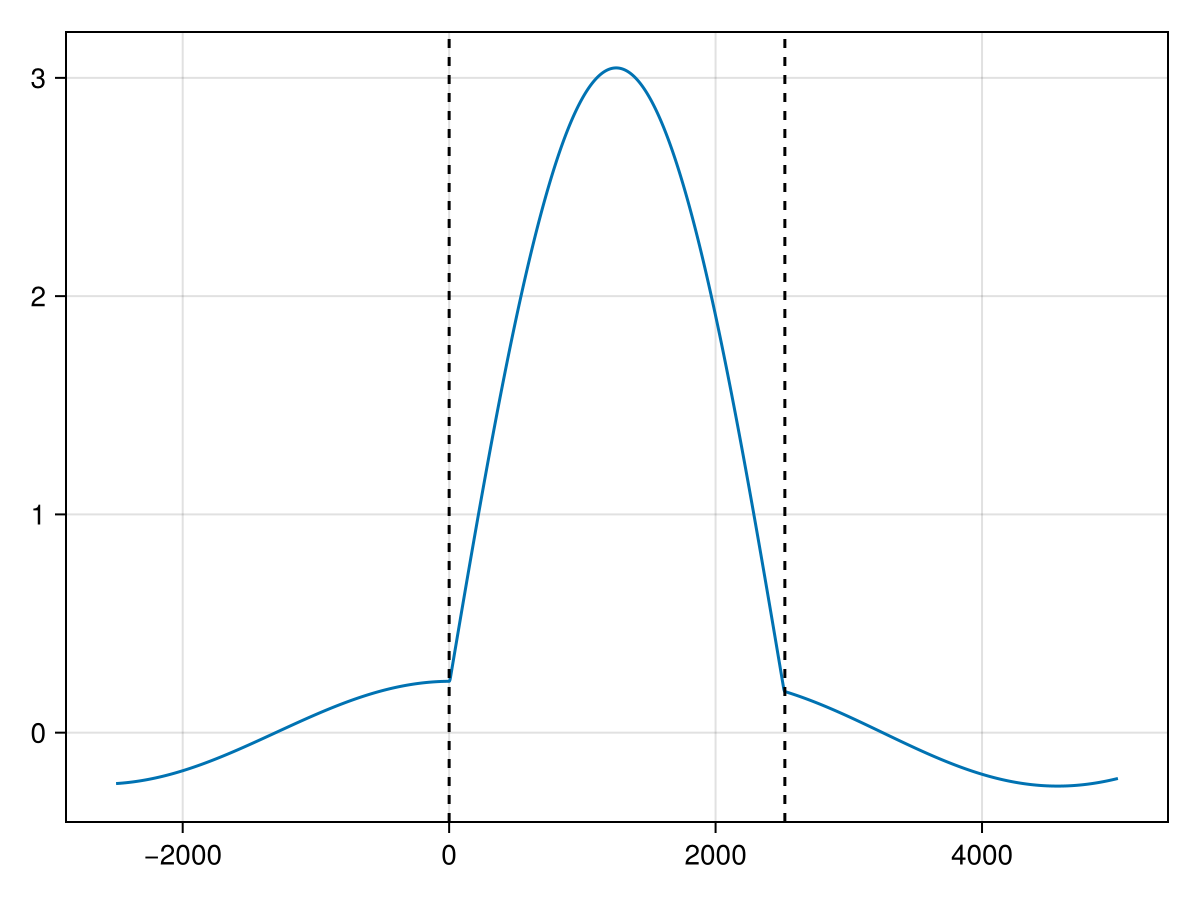
Mode amplitudes and layer energies
efield samples the field on a z-grid; the coefficients it expands are available directly from mode_amplitudes. Each layer gets a 4-vector of Berreman mode amplitudes for p and for s incidence, in the slot order (forward p, forward s, backward p, backward s), referenced to the layer's entry face (the incident medium to z = 0), so the incident medium reads (1, 0, rpp, rps) and the exit medium (tpp, tps, 0, 0):
A = mode_amplitudes(λ, layers)
A.p[1], A.p[end]
(ComplexF64[0.9999999999999973 - 8.604228440844963e-16im, -0.0 + 0.0im, 0.7646273290189316 - 0.003034690609523008im, 0.0 + 0.0im], ComplexF64[0.1883618351123203 + 0.1562819134841611im, 0.0 - 0.0im, 0.0 + 0.0im, 0.0 + 0.0im])The complex r/t coefficients themselves come from amplitude_coefficients (note rpp = -rss at normal incidence: the backward p mode vector is -x̂):
amplitude_coefficients(λ, layers)(rpp = 0.7646273290189372 - 0.0030346906095289274im, rps = 0.0 + 0.0im, rsp = 0.0 + 0.0im, rss = -0.7646273290189372 + 0.0030346906095290323im, tpp = 0.18836183511231694 + 0.15628191348416864im, tps = 0.0 - 0.0im, tsp = 0.0 - 0.0im, tss = 0.18836183511231686 + 0.15628191348416873im)With the amplitudes in hand, $\int E^\dagger ε E\,dz$ over each finite layer has a closed form, so no field sampling is needed. Here the gap is layer 3, i.e. the second finite layer:
U = layer_energies(λ, layers)
U.p[2]14.114924377830743U is in μm for a unit incident field. For transparent dielectric layers it is the electric energy, so in an all-dielectric structure such as a DBR cavity the fraction stored in the gap is U.p[gap - 1] / sum(U.p). The gold mirrors here have Re ε < 0, so their entries are negative and that fraction is not meaningful for this stack (see layer_energies).
User-generated refractive index data
A convenience function is available to generate a Layer with user-generated refractive index data. For example, if we want to make an absorbing layer modeled on a Lorentzian function, we would
- Generate the dielectric function for the absorbing material.
- Calculate the refractive index and extinction coefficient.
\[\begin{aligned} \varepsilon_r(\omega) &= n_\infty^2 + \frac{A (\omega_0^2 - \omega^2)}{(\omega^2 - \omega_0^2)^2 + (\Gamma \omega)^2} \\ \varepsilon_i(\omega) &= \frac{A \Gamma \omega}{(\omega^2 - \omega_0^2)^2 + (\Gamma \omega)^2} \\ n(\omega) &= \sqrt{\frac{\varepsilon_r + \sqrt{\varepsilon_r^2 + \varepsilon_i^2}}{2}} \\ k(\omega) &= \sqrt{\frac{-\varepsilon_r + \sqrt{\varepsilon_r^2 + \varepsilon_i^2}}{2}} \\ \end{aligned}\]
where $A$ is the amplitude, $\omega_0$ is the resonant frequency, $\Gamma$ is phenomenological damping, and $n_\infty$ is the background refractive index. Then this data, along with the wavelengths and thickness of the layer, can be used to create a Layer object. Under the hood, this data is converted into an interpolation function that, when given a wavelength, will return the complex refractive index. (Extrapolation is not supported right now.)
function dielectric_real(ω, p)
    A, ω_0, Γ = p
    return @. A * (ω_0^2 - ω^2) / ((ω^2 - ω_0^2)^2 + (Γ * ω)^2)
end

function dielectric_imag(ω, p)
    A, ω_0, Γ = p
    return @. A * Γ * ω / ((ω^2 - ω_0^2)^2 + (Γ * ω)^2)
end

# absorbing material
λ_0 = 5.0
λs = range(4.8, 5.2, length = 200)
frequencies = 10^4 ./ λs
n_bg = 1.4
A_0 = 3000.0
ω_0 = 10^4 / λ_0  # cm^-1
Γ_0 = 5
p0 = [A_0, ω_0, Γ_0]
ε1 = dielectric_real(frequencies, p0) .+ n_bg^2
ε2 = dielectric_imag(frequencies, p0)
n_medium = @. sqrt((sqrt(abs2(ε1) + abs2(ε2)) + ε1) / 2)
k_medium = @. sqrt((sqrt(abs2(ε1) + abs2(ε2)) - ε1) / 2)

absorber = Layer(λs, n_medium, k_medium, t_cav)
absorber.dispersion(4.9)
A complete example calculating dispersion of a polaritonic system is provided in the examples folder of the package source code.
See the Thickness dependence example for sweeping a layer thickness.
See the Cholesteric circular Bragg example for circular-polarization (basis=:circular) output.
Magnetic layers
Layers with non-trivial magnetic permeability use the mu= keyword. The value can be a scalar, a constant 3×3 matrix, or a wavelength-dependent function returning a 3×3 matrix.
using TransferMatrix

# Uniaxial-μ slab between air half-spaces
slab = Layer(λ -> 1.5, 0.3; mu = [2 0 0; 0 2 0; 0 0 3])
layers = [Layer(λ -> 1.0, 1.0), slab, Layer(λ -> 1.0, 1.0)]
result = transfer(0.5, layers)

# Gyromagnetic ferrite film (constant Polder tensor)
film = Layer(λ -> 1.0, 0.4; mu = gyrotropic_tensor(2.0, 0.6))
layers = [Layer(λ -> 1.0, 1.0), film, Layer(λ -> 1.0, 1.0)]
result = transfer(0.5, layers)
The global μ= kwarg on transfer / sweep_angle / sweep_thickness sets a scalar fallback for every layer whose mu field is nothing; a layer's own mu overrides it.